


Description
PotPlayer (32-bit) – Seamless Video Playback
Overview
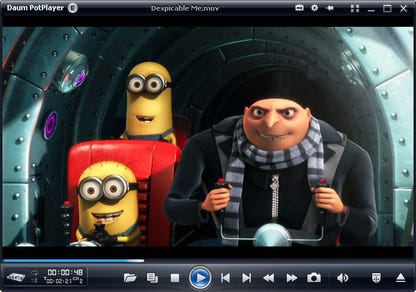
PotPlayer (32-bit) is a feature-rich video player designed for users seeking a reliable and versatile solution for playing digital video content. Built with a focus on compatibility and performance, the software is engineered to handle a broad range of video formats without requiring external codec installations. This makes it an ideal tool for both casual viewers and professionals who work with diverse media files. The player supports a variety of video sources, including local files, capture devices, and broadcast signals, enabling users to enjoy content from multiple origins within a single application.
Target users include home users managing personal video libraries, content creators working with different formats, and anyone who values a customizable and efficient media playback experience. While the developer’s background is not detailed in the provided information, the software’s long-standing presence in the market suggests a dedicated development team focused on stability and functionality. Real-world usage scenarios range from watching high-definition movies to monitoring live TV feeds or reviewing footage from digital recorders.
Key Features & Capabilities
- Built-in Codecs – PotPlayer includes a comprehensive set of codecs, allowing it to play most video formats directly. This eliminates the need for third-party codec packs, reducing system clutter and potential conflicts.
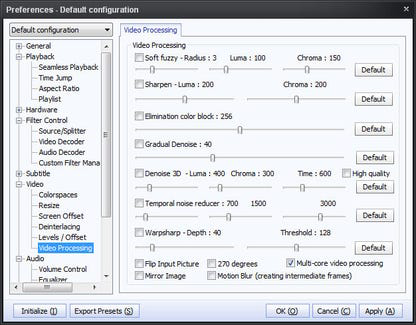
- Extensive Controls and Settings – Users can access a wide array of configuration options through the main interface, context menus, or the system tray. This includes audio output, filter management, and rendering preferences, enabling precise control over playback.
- Customizable Interface – The player features a modern, skinnable interface that supports visual customization. Users can modify layouts, themes, and button placements to match their preferred aesthetic and workflow.
- Multi-Device Support – PotPlayer is compatible with various video input sources, such as webcams, digital recorders, DVD players, and both analog and digital TV tuners, making it suitable for live content viewing.
- Advanced Preferences – A detailed Preferences panel allows users to configure network settings, device management, and playback behaviors, offering deep customization for power users.
User Interface, Workflow & Performance
The user interface of PotPlayer (32-bit) is structured to balance functionality with accessibility. Main controls are prominently displayed, while advanced options are organized into clearly labeled menus. Navigation is intuitive, with right-click context menus providing quick access to frequently used settings. The workflow is streamlined for both quick playback and in-depth configuration, allowing users to switch between simple viewing and detailed tuning without disruption.
Performance details were not specified by the developer. However, the software’s lightweight footprint of 19.4 MB suggests efficient resource usage. The player is designed to maintain smooth playback across a variety of video resolutions and bitrates. Stability appears consistent with the software’s long-term usage history, though specific performance benchmarks were not provided. The developer did not specify resource usage details, such as CPU or RAM consumption during playback.
Compatibility & System Requirements
PotPlayer (32-bit) is designed for Windows operating systems. The software version is 1.7.21111, and the installation size is 19.4 MB. The developer did not provide additional system requirements. Compatibility information is limited to the Windows platform, and no details were given regarding minimum hardware specifications such as processor speed, RAM, or graphics capabilities. Users should ensure their system meets general Windows requirements for running desktop applications.
Pros and Cons
Pros
- Supports a wide range of video formats out of the box
- Eliminates the need for external codec installations
- Highly customizable interface and layout
- Compatible with multiple video input devices
- Free to use with no licensing restrictions
Cons
- No official system requirements provided
- Interface may feel overwhelming for new users
- 32-bit version may have limitations on modern systems
- Advanced settings require technical knowledge
- Updates may not be consistently announced
FAQ Section
Is PotPlayer (32-bit) compatible with Windows?
Yes, PotPlayer (32-bit) is designed for Windows operating systems. The developer did not specify exact OS versions, but it is intended for use on standard Windows desktop environments.
Is the software safe to download and use?
PotPlayer (32-bit) is a free desktop application developed for video playback. It does not include known malware or intrusive behavior. As with any software, users should download from trusted sources to ensure integrity.
Does PotPlayer require updates?
Regular updates are typically released to improve compatibility, fix bugs, and enhance performance. The software’s version history indicates ongoing development, suggesting that updates are part of the maintenance cycle.
What type of license does PotPlayer use?
PotPlayer (32-bit) is distributed as free software. It does not require a paid license or subscription for full functionality.
Can I use PotPlayer offline?
Yes, PotPlayer (32-bit) operates fully offline. No internet connection is required for playback, configuration, or basic use. Some features may require network access, but core functionality remains available without connectivity.
Final Thoughts
PotPlayer (32-bit) stands out as a powerful and flexible video player for users who demand broad compatibility and deep customization. Its built-in codecs, multi-device support, and extensive settings make it a strong choice for both everyday viewing and professional media workflows. While the lack of detailed system requirements and the 32-bit limitation may pose challenges on newer systems, the software remains a reliable and efficient tool for Windows users. For those seeking a free, feature-rich video player with minimal setup, PotPlayer delivers a robust experience.
Download PotPlayer (32-bit) now.
Guides & Tutorials for PotPlayer (32-bit)
How to install PotPlayer (32-bit)
- Click the Preview / Download button above.
- Once redirected, accept the terms and click Install.
- Wait for the PotPlayer (32-bit) download to finish on your device.
How to use PotPlayer (32-bit)
This software is primarily used for its core features described above. Open the app after installation to explore its capabilities.
User Reviews for PotPlayer (32-bit) 0
No reviews found


